 Reelsmith
How to Add an Animated Subscribe Button to Your Video
Add an animated subscribe, like or bell button with a transparent background — and a click-and-bell sound — to your video in a free browser editor.
A short "subscribe" reminder near the start or end of a video is a simple way to grow a channel. Reelsmith includes animated buttons that are ready to use, with transparent backgrounds — no green screen or background removal needed.
1. Open the Library
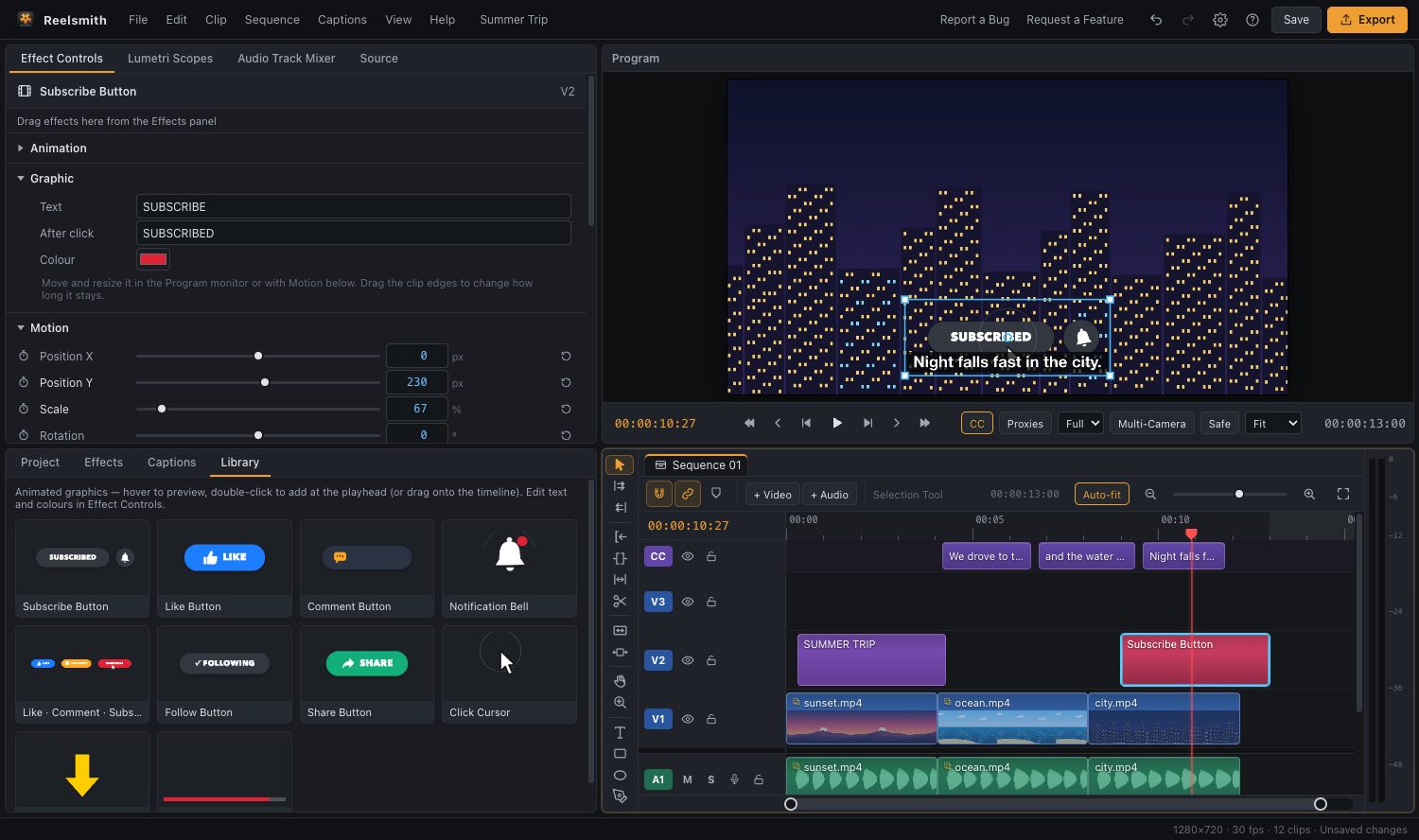
Click the Library tab (next to Project, Effects and Captions). You'll find:
- Subscribe Button, Like Button, Comment Button and Notification Bell
- Like · Comment · Subscribe (all three in one)
- Follow Button, Share Button, Click Cursor, Bouncing Arrow and Progress Bar
Hover over a card to preview the animation.
2. Add it to the video
- Double-click a card to add it at the playhead, or
- drag it onto a track above your video.
It's placed on V2 or higher, sized for your frame — including vertical 9:16 videos.
3. Make it yours
Select the graphic and open Effect Controls ▸ Graphic to change the text (for example SUBSCRIBE → JOIN) and the colours. Move and resize it in the Program monitor, and drag the clip's edges on the timeline to make it stay longer or shorter.
You can also add an In, Out or Loop animation from Effects ▸ Animations — try Pop in and Pulse as a loop.
The click-and-bell sound
The Subscribe Button comes with a matching sound: a click as the cursor presses the button, then a bell as the bell icon swings. The sound is placed on an audio track and linked to the graphic, so they move together.
Don't want the sound? Select the graphic, press ⌘L (Ctrl+L on Windows) to unlink it, then click the audio clip and press Delete.
When to show it
- After you've delivered something useful — viewers are more likely to subscribe once they've got value.
- For 3–5 seconds, in a corner that doesn't cover faces or important text.
- Once or twice per video, not constantly.