 Reelsmith
The free video editor that runs in your browser
A real multi-track editor — timeline, titles, transitions, color, audio and auto captions — with nothing to install. Your videos are never uploaded.
Open the editor — it’s freeSee tutorials
No download, no account, no watermark. Works in Chrome, Edge, Safari and Firefox.
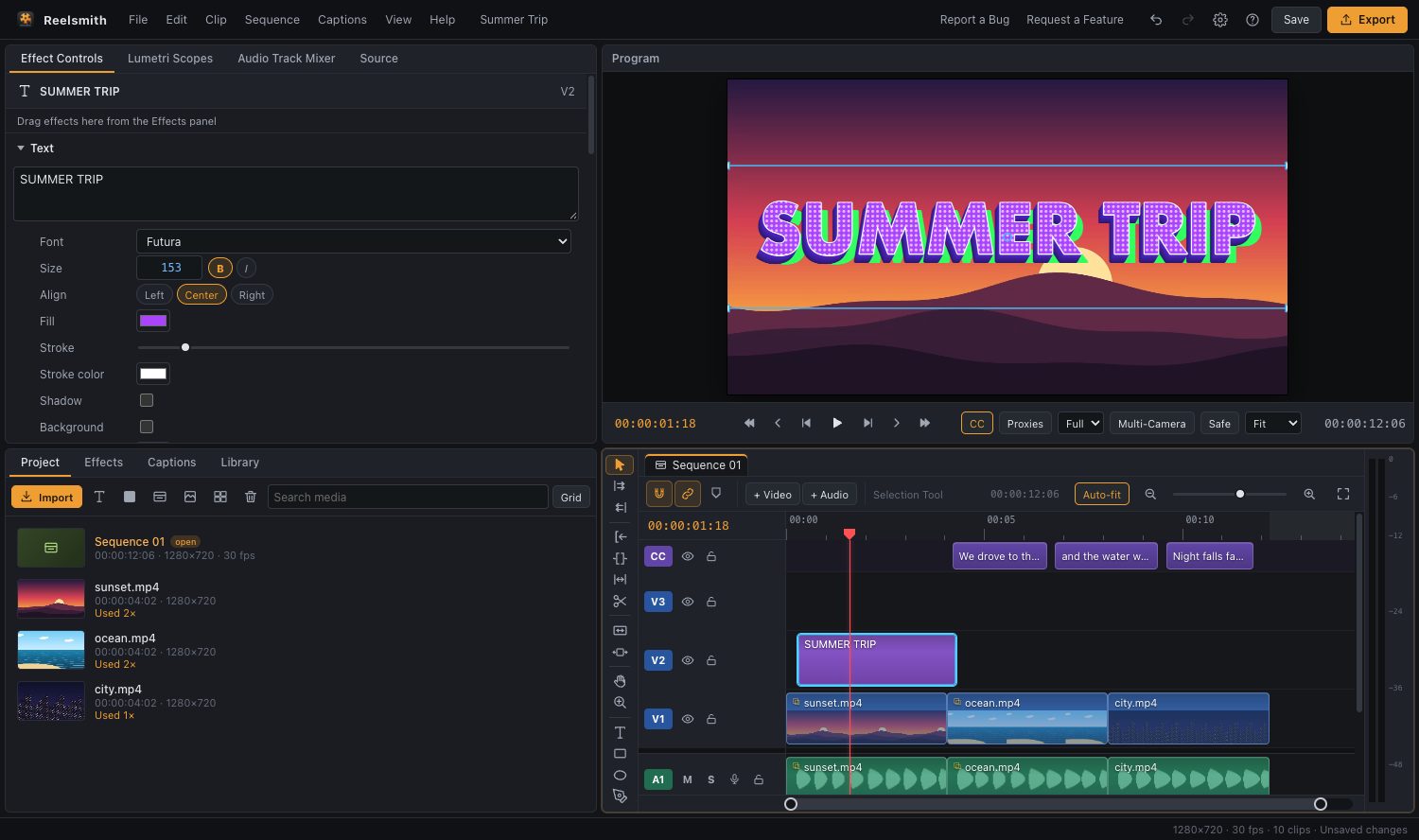
Everything you need to edit
A real timeline
Unlimited video and audio tracks, magnetic snapping, ripple and rolling edits, slip and slide, the razor tool and frame-accurate trimming. Detach audio from video with one shortcut. See Timeline basics.
Titles and text effects
Type directly on the video. Style text with 3D extrusion, gradients, outlines, glow and halftone, then animate it word by word or letter by letter with one drag. See Text effects.
Auto captions, privately
Generate subtitles from speech in more than 20 languages. Speech recognition runs on your own computer — the audio is never uploaded. Edit captions, burn them in or export an .srt file. See Captions and subtitles.
30 transitions
Cross Dissolve, Push, Whip Pan, Zoom, Spin, Glitch, Film Burn, Heart and Diamond Iris, plus colourful shape transitions that sweep over the cut. See Fun and shape transitions.
Remove backgrounds
Make a logo transparent, or drop the white or green background from an overlay video such as a subscribe animation. See Remove a video background.
Color and scopes
Lumetri-style color with basic correction, creative looks, curves and color wheels, checked on a waveform, vectorscope and histogram. See Lumetri Color.
Audio that sounds right
Volume up to 300 %, loudness normalization, EQ, compressor, noise gate and hum removal, voice effects, 19 built-in sound effects and automatic music ducking under speech. See Audio effects.
Fast export
H.264 MP4 or WebM, faster than real time, with presets for YouTube, Shorts, Reels, TikTok, Instagram and more. Vertical or landscape is picked from your footage automatically. See Exporting a video.
Built for creators
- Library: animated subscribe, like, comment, bell and follow buttons with transparent backgrounds — the Subscribe Button even comes with a click-and-bell sound.
- Animations: In, Out and Loop animations for any clip, title or sticker.
- Creative effects: camera shake, zoom punch, RGB split, VHS, film grain, glow, letterbox and more.
- Pro tools: keyframes, masks with tracking, nested sequences, multi-camera editing and adjustment layers.
Private by design
Reelsmith is a web page, but your editing happens on your computer. Videos are read straight from your disk, previewed and exported by your browser, and never sent to a server. Projects are saved in your browser, and you can download a project file at any time. Read more in Why your videos never leave your computer.
Works where you are
- Chrome and Edge on Windows, macOS, Linux and ChromeOS: the fastest experience, with export straight to a folder you pick.
- Safari and Firefox work too; exports go to your Downloads folder.
- No account, no watermark, no time limit.
Frequently asked questions
Is Reelsmith really free?
Yes. The editor is free to use, with no watermark and no sign-up.
Are my videos uploaded?
No. Files are opened directly from your computer and processed in your browser. Only the optional caption engine is downloaded once from Hugging Face; your audio still stays on your device.
What formats can I import?
MP4, MOV, M4V, WebM and MKV video (H.264, HEVC, VP8, VP9 and AV1, depending on your browser), MP3, WAV, M4A, AAC, OGG and FLAC audio, and PNG, JPG, GIF, WebP and SVG images.
Can I edit vertical videos for Shorts, Reels and TikTok?
Yes. Add a vertical clip and the sequence becomes 9:16 automatically. See Make vertical videos for Shorts, Reels and TikTok.