 Reelsmith
How to Make Vertical Videos for Shorts, Reels and TikTok
Edit 9:16 vertical videos in your browser — turn landscape footage vertical, add captions and text, and export at the right size for Shorts, Reels and TikTok.
Short-form platforms expect vertical 9:16 video at 1080×1920. Here is how to set that up in Reelsmith, whether you filmed vertically or horizontally.
If you filmed vertically
Start a project and drop in your phone clip. In a new sequence, the first video you add sets the frame size — a vertical clip makes a 9:16 sequence automatically. A message confirms it, and ⌘Z (Ctrl+Z on Windows) undoes it.
If you filmed horizontally
- Choose Sequence ▸ Sequence Settings… and pick the Vertical 9:16 (1080×1920) preset.
- Add your landscape clip. It sits in the middle with empty space above and below.
- Select the clip and open Effect Controls ▸ Motion. Raise Scale until the picture fills the height, then drag it left or right in the Program monitor to frame your subject.
Make it work without sound
Most people scroll with the sound off, so text matters:
- Auto captions: Captions ▸ Auto-generate Captions… writes subtitles from your speech — see How to add subtitles automatically.
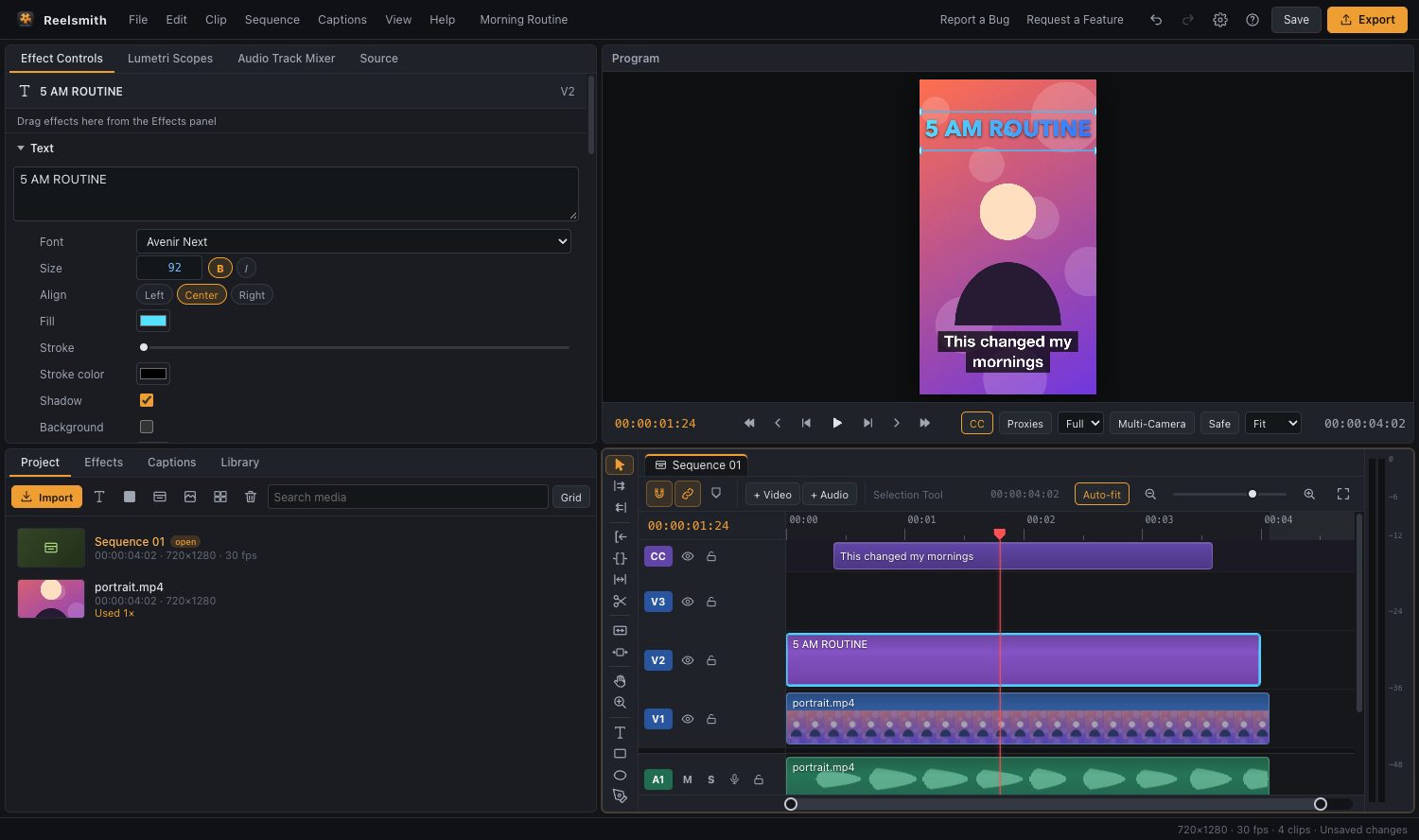
- A hook in the first second: press
T, click the video and type a short headline. Then try a style from Effects ▸ Text Styles and an animation such as Words Pop from Effects ▸ Animations — In. - Keep text in the middle: the top and bottom of the screen are often covered by the app's buttons and captions. Click Safe in the Program monitor to show safe margins.
Keep it moving
- Cut out pauses with the razor tool (
C), then delete the gaps (see Deleting clips and closing gaps) so the video never stalls. - Use quick transitions like Whip Pan, Zoom In or Flash between scenes, and the Zoom Punch (beat) effect from Effects ▸ Creative Effects for emphasis.
- Add a sound effect (Effects ▸ Sound Effects) on key moments.
Export at the right size
Click Export and choose the YouTube Shorts / Reels / TikTok (9:16) preset — 1080×1920 H.264 MP4. If your sequence is already vertical, Match Source gives the same result. Then upload the file from your phone or computer.